




Azure prices the same virtual machine several different ways, and the largest recoverable lever in a typical estate is a licensing decision rather than an engineering one.
Azure's cost surface is genuinely harder to reason about than AWS's, and we are not going to pretend otherwise. Reservations, savings plans, spot capacity and licensing all price the same virtual machine differently. Our working view, from the cloud cost audits we run, is that the largest single lever in a typical Azure estate is Azure Hybrid Benefit, which is a licensing decision made in a Microsoft agreement rather than a change an engineer ships.
That is an uncomfortable sentence for an engineering-led advisory to write. Teleport Dynamix publishes a 20 to 40% recoverable band on cloud spend and we argue, hard, that cloud cost is an engineering discipline before it is a billing one. On Azure, a meaningful slice of that band is sitting inside a contract your finance team already signed.
Both things are true at once. This piece, the closing chapter of our six-part series on cloud cost, is about the Azure-specific mechanisms: what each commitment model actually does, which levers engineering owns, which it does not, and the order to pull them in. If you came here from the AWS cost optimization checklist, read what follows as the Azure translation of the same discipline rather than a copy, because the differences are the whole point.
Key takeaways
- Azure cost optimization is not an AWS checklist with the nouns swapped. The commitment models, the licensing rules and the governance scopes behave differently, and the differences are where the money is.
- Azure Hybrid Benefit is the lever engineering teams miss because engineering teams do not own it. It applies existing Windows Server and SQL Server licenses to Azure compute, and it is decided in a Microsoft agreement, not in a pull request.
- Reservations lock a resource. Savings plans lock a spend. Spot buys capacity nobody else wanted. Buying any of them before right-sizing locks in the waste at a discount.
- The boring recoveries are real: unattached managed disks, orphaned public IPs, over-tiered storage, App Service plans running one app each, and non-production environments that exist at 3am for nobody.
- Governance on Azure is a scope problem first. Management groups, subscriptions and tags decide whether a budget alert reaches a person who can act on it.
Azure prices the same machine in several incompatible ways
Every cloud sells discounts. Azure sells four that interact, and teams routinely buy the wrong one because the marketing names sound interchangeable.
They are not interchangeable. Each one trades a different kind of flexibility for a different size of discount, and knowing which flexibility you can afford to give up is the entire skill.
Which Azure discount model fits which workload?
The table below compares Azure pay-as-you-go, reservations, savings plans, spot and Azure Hybrid Benefit on what each one discounts, what it commits you to, and when to buy it.
| Model | What it discounts | What you commit to | When to buy it |
|---|---|---|---|
| Pay-as-you-go | Nothing, this is the list rate | Nothing at all | Workloads too new or too short lived to have a shape |
| Reservations | A specific VM size in a specific region | One or three years on that exact shape | Architecture is stable and the running shape is known |
| Savings plans | Eligible compute across families and regions | One or three years of hourly spend | Architecture still changes during the term |
| Spot | Spare capacity, at the deepest discount | Accepting eviction on 30 seconds of notice | Batch, CI, render and node pools that checkpoint and resume |
| Hybrid Benefit | The Windows Server or SQL Server license component | Nothing new, only an entitlement you already hold | You own licensing with active Software Assurance |
Reservations lock a resource, savings plans lock a spend
The tradeoff is blunt: the deepest discounts come with the tightest commitment, and the commitment is to a shape, not to a bill. The practitioner argument about whether to right-size or reserve first lands in the same place we do, which tells you the sequencing problem is structural rather than a matter of taste.
Pick by how stable your architecture is, not by which number is bigger. A team that migrates instance families twice a year and buys three-year reservations has bought a very efficient way to pay for machines it stopped using.
Spot is capacity nobody else wanted, priced accordingly
Spot virtual machines run on Azure's spare capacity and can be evicted with 30 seconds of notice, and the discounts look absurd until you remember what you are agreeing to.
It is the wrong instrument for anything holding a session a customer can feel. Eviction is the price of the discount, and it arrives on a schedule Azure chooses rather than one you planned for.
Steel-man it properly and spot becomes a design constraint rather than a discount. Workloads that survive eviction are workloads that survive a lot of other things too.
Hybrid Benefit is the lever engineering does not own
Here is the part that stings. Azure Hybrid Benefit lets an organization apply on-premises Windows Server and SQL Server licenses with active Software Assurance against Azure compute, and Microsoft's own licensing documentation sets out exactly which entitlements qualify.
No code changes. No architecture review. A checkbox and an entitlement your company may already be paying for.
A company can run hundreds of Windows virtual machines at list price while the matching licenses sit unused in an agreement nobody in engineering has ever read. The engineers are not the problem here. The problem is that the cheapest change in the estate lives in a document that never reaches them.
Right-sizing needs a percentile, not a feeling
Compute in a long-lived Azure estate is usually provisioned against a load estimate made before the product had its current users. The instances were sized for a peak, the peak arrived somewhere else, and nothing broke, so nothing changed.
Azure Advisor will surface the obvious cases for free. It reads utilization telemetry and flags underused and idle resources with a recommended action attached, and the fast Azure levers practitioners reach for first are mostly the ones it lists.
Treat it as a candidate list, never as an instruction. Advisor sees CPU and network. It does not see the quarterly job that needs every core for six hours, and it does not know which service pages someone at 3am. Three things routinely trip up a team that resizes on the recommendation alone:
- The quarterly job is invisible to it. A service idle for eighty-nine days and pinned on the ninetieth reads as a candidate for a smaller size.
- The 3am dependency does not show up. Advisor cannot tell you which quiet service the on-call rota leans on at the worst possible hour.
- Deliberate headroom looks like waste. Capacity you reserved on purpose registers as an idle resource it would happily reclaim.
Read utilization where your risk actually lives
Size against the 95th or 99th percentile of observed load, not the mean and not the maximum. The mean hides the spikes that hurt you. The maximum is usually one anomalous minute that is holding an entire fleet hostage.
Then move one size class, watch it for a full business cycle, and move again. Two careful steps beat one heroic step that pages someone and permanently ends the team's appetite for cost work. The whole aim is to reduce cloud costs without losing engineering speed, and a single reckless resize sabotages exactly that.
AKS node pools are where container savings hide
A Kubernetes cluster arrives on the invoice as compute, which means the bill tells you nothing about which workload caused it. That abstraction is the entire point of the platform, and it is also why clusters became the black hole of FinOps, a problem tracked closely by the engineering community that runs them.
On Azure the practical move is node pool separation. Put system workloads on a small, reserved, always-on pool. Put burstable and batch work on a spot-backed pool that scales to zero. Put memory-hungry services on a family sized for memory rather than paying for cores you will never schedule.
Requests and limits copied from a tutorial three years ago are the other half of it. The scheduler places a pod against its requests rather than against what it actually uses, so a pod that requests four cores and uses one still holds four cores of the node you are paying for. That is not a Kubernetes problem. It is a number somebody typed once.
App Service plans get bought one app at a time
Azure App Service bills the plan, not the app. Teams provision a plan per application because that is how the portal reads on the day you create it, so the plan count ends up tracking the number of applications rather than the load any of them puts on a core.
Consolidate the compatible ones onto a shared plan sized against combined load. Keep the noisy neighbor isolated on purpose, because you decided to, not because a default did.
Storage and network leftovers bill forever
Compute gets attention because it is expensive and visible. The leftovers get none, which is exactly why they last.
Nobody queries them. Nobody misses them. Microsoft will bill them for a decade if you let it.
They persist because deletion has an owner problem rather than a technical one. Nobody wants to be the person who removed the disk that turned out to matter, so the safe move is to leave it alone, and the safe move quietly costs money every month for years.
Premium SSD is a promise about latency, not importance
Disk tiering is where teams confuse two different questions. Premium SSD buys guaranteed IOPS and low latency. Standard SSD buys adequate throughput for workloads that are not latency-bound, and the managed disk price list puts a number on the difference between those two sentences.
Development environments, log volumes, build agents and batch workers almost never need the premium tier, and they get it because the deployment template inherited it from production. Tier by measured IO, not by how important the service feels.
Feelings are not an access pattern.
Unattached disks and orphaned public IPs
Run the inventory first. The four Azure leftovers below are compared on why each one survives a cleanup, how to prove it is genuinely dead, and what deleting it actually costs you.
| Leftover | Why it survives | How to prove it is dead | Cost of deleting it |
|---|---|---|---|
| Unattached managed disk | Billing follows the provisioned tier, not the attachment | No VM reference and no recent read or write activity | Nothing, once a snapshot exists |
| Static public IP | Reserved addresses outlive the load balancer that needed them | No associated NIC, gateway or DNS record pointing at it | Losing the address if a client hardcoded it |
| Snapshot of a deleted VM | Deleting felt riskier than paying to keep it | Source machine gone and no restore in the retention policy | Nothing, once retention is written down |
| Orphaned network interface | Invisible in the portal until somebody queries for it | No parent virtual machine and no private endpoint attached | Nothing at all |
Snapshots and redundancy settings are the quiet half of an Azure storage bill, and they keep charging long after anyone remembers requesting them.
This is pure waste with no counter-argument, and it is the reason our cloud cost audit starts with an inventory rather than an architecture debate. Deleting an orphan costs nothing and risks nothing, once you have proven the resource is genuinely unreferenced. That last clause is the whole job.
Non-production should not exist at 3am
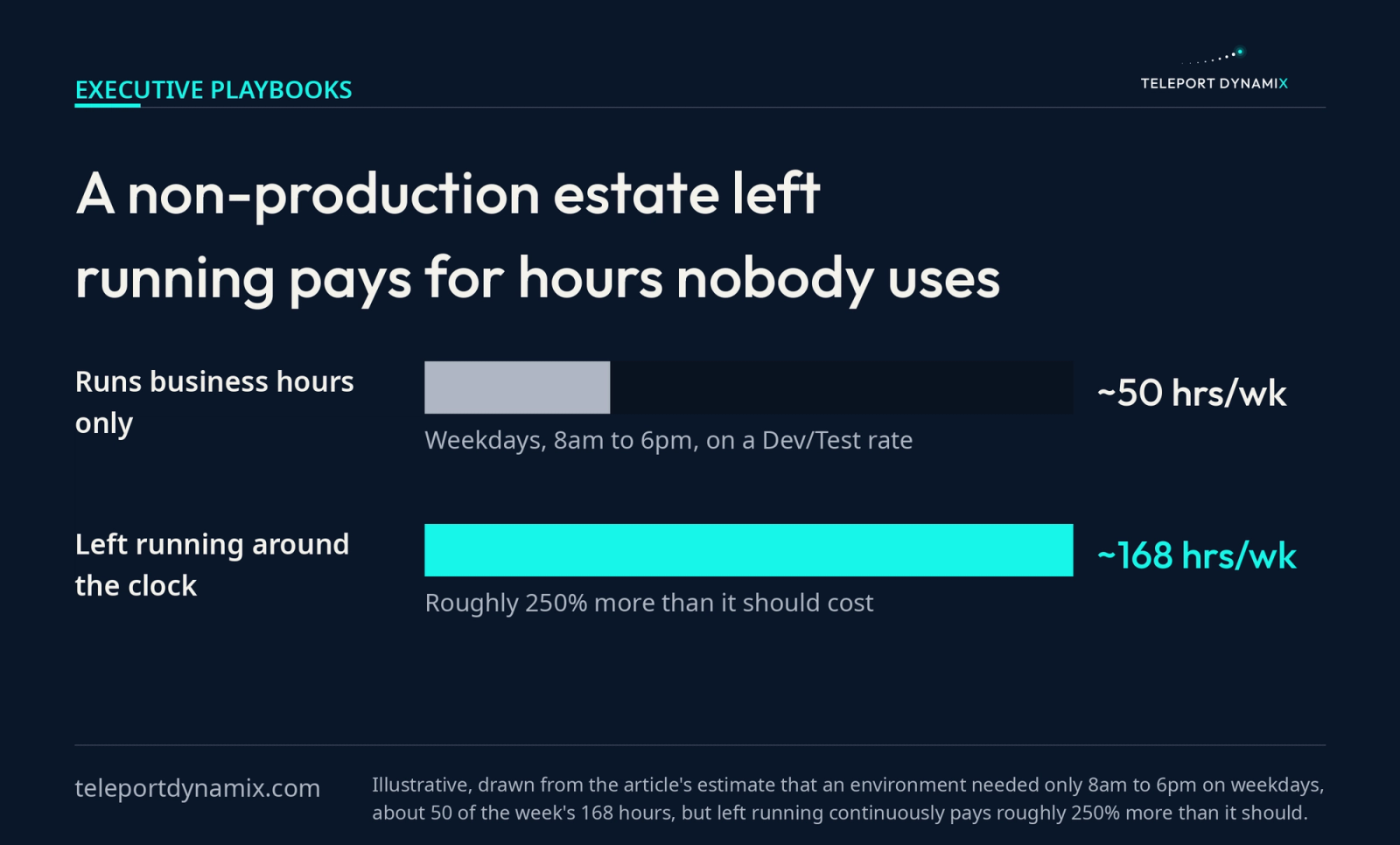
Development, staging, QA and the load-test cluster spun up for a launch that shipped in March all follow the working week. The working week is under a third of the hours in it.
Azure Dev/Test subscriptions carry discounted rates for exactly this class of workload, and Azure VMs ship with an auto-shutdown schedule that takes about a minute to configure. An environment that needs to exist from 8am to 6pm on weekdays and instead runs continuously is paying roughly 250% more than it should.
Auto-shutdown is configured per virtual machine, so it protects exactly the resources somebody remembered to tick and nothing else. The scale set, the managed database and the test cluster behind that environment keep their own hours.
Start with the environment nobody defends. The load-test cluster from March has no owner willing to argue for it, which makes it the cheapest place to prove a schedule holds before you point one at staging.
The engineering is trivial. The obstacle is not.
Teams leave environments running because their infrastructure is not reproducible, so the environment becomes precious and nobody dares delete it. Fix the reproducibility, treat the environment as something you declare rather than something you keep, and the savings arrive as a side effect of an engineering practice you wanted anyway. That is usually a scalability review finding wearing a cost finding's clothes.
Governance is a scope problem before it is a spend problem
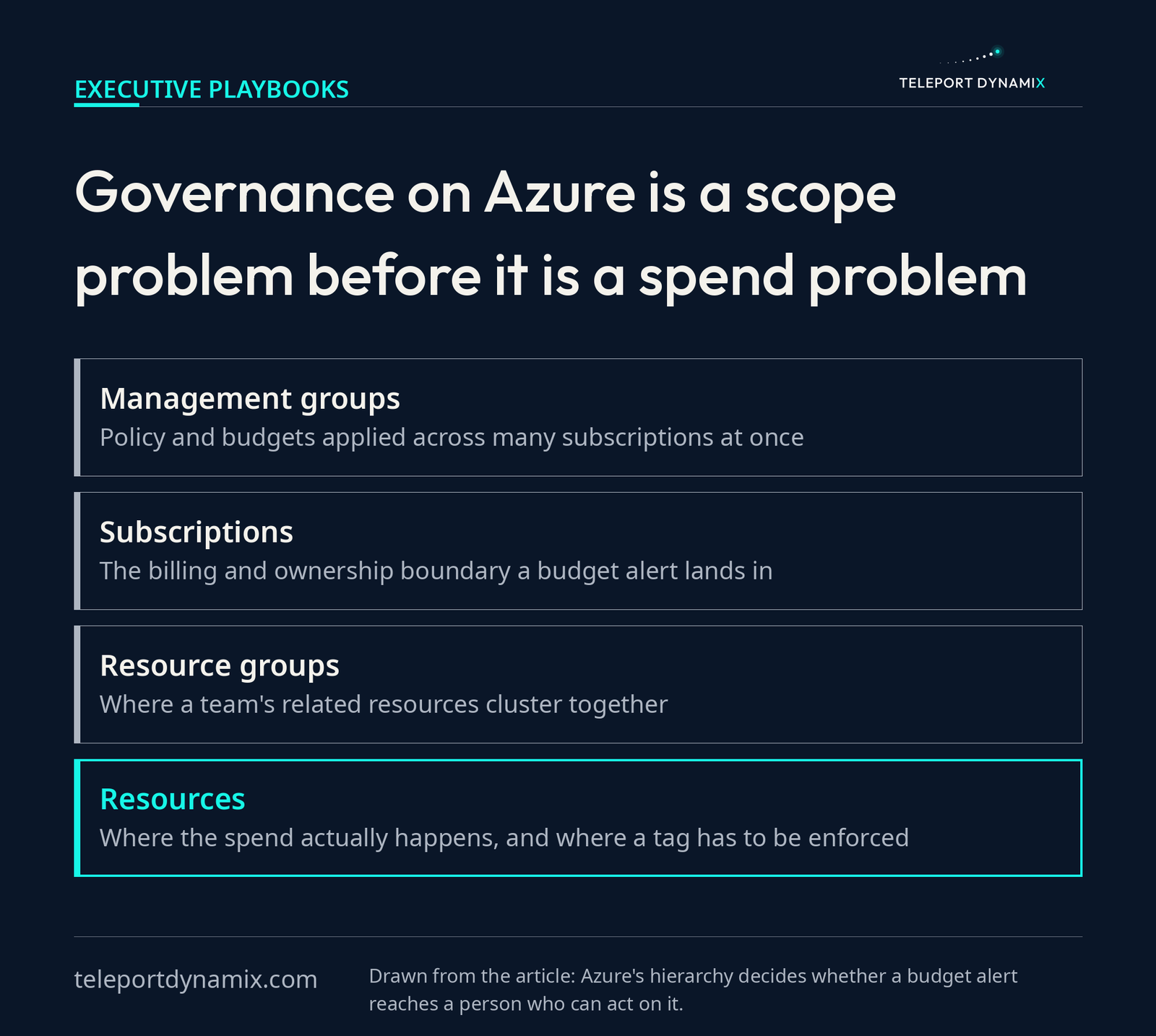
Scope is not administrative decoration in Azure. It decides whether a budget alert reaches a human being who can act on it.
Which Azure scope should own a budget?
Azure's four governance scopes are compared below on what each one groups, who should own its budget, and how cost work fails at that level.
| Scope | What it groups | Who should own the budget | How it fails |
|---|---|---|---|
| Management group | Whole business units or environments across many subscriptions | Finance together with the platform lead | Policy set here silently governs every subscription beneath it |
| Subscription | One team, product or environment boundary | The engineering lead who owns that product | A shared subscription turns every cost question into a negotiation |
| Resource group | Resources deployed and deleted together as a unit | The team that owns the deployment | Long-lived groups accumulate orphans nobody claims |
| Resource | A single disk, address, virtual machine or App Service plan | Whoever provisioned it | An untagged resource lands in a pool nobody can attribute |
Enforce tags at provisioning time in policy, not by asking for them in a Slack channel. A tag policy that depends on human diligence has a half-life measured in weeks.
Allocation comes before optimization, which is the FinOps discipline compressed into one sentence. If 30% of your Azure spend lands in an untagged subscription called "shared," every conversation about it is a negotiation instead of an engineering exercise, and the allocation work that makes an Azure estate legible never starts.
An estate nobody can attribute is also one nobody can defend in technical due diligence.
What changes when the license lands first
Pull the licensing lever before the engineering ones and the sequence pays twice. The entitlement discount lands on machines nobody has resized yet, and every cut made afterward compounds against a licensed rate instead of a list one.
Run it the other way and the same work earns less. A team that spends a sprint right-sizing, then discovers the Hybrid Benefit entitlement, has applied a license discount to a smaller fleet than it could have.
- The Windows fleet stops paying twice, once to Microsoft under Software Assurance and again to Azure at the pay-as-you-go rate.
- The commitment bought at the end is smaller, because you reserve a right-sized estate at a licensed rate rather than an oversized one at list.
- Procurement and engineering finally read the same document, because somebody had to open the Microsoft agreement to answer the licensing question.
Three months in, the line that moved is rarely the clever one. The boring sequence does it: entitlements applied, sizes corrected against a percentile, leftovers deleted, non-production asleep by 6pm, commitments bought last against a floor the workload genuinely holds.
Somebody owns a unit cost number and reports it on a cadence, because in the end cloud cost management needs an owner, not a tool. Cost that is visible at the moment of the decision gets managed. Cost that surfaces thirty days later on a document nobody reads does not.
That is why the advisory side and the studio run out of one team at Teleport Dynamix. The people who argue about a license line on our own ventures are the people who read yours.
None of this needs a new tool. It needs somebody to read the Microsoft agreement, then read the invoice, and notice that the two documents describe different companies.
Frequently Asked Questions
Which two services can be used to manage costs in Azure?
Microsoft Cost Management and Azure Advisor. Cost Management handles analysis, budgets, alerts and allocation across your billing scopes, showing where money went and warning you before a threshold breaks. Advisor reads utilization telemetry and recommends specific actions, such as resizing an underused virtual machine or deleting an idle resource. You need both, because one reports and the other prescribes.
What is the difference between Azure Cost Management and Advisor?
Cost Management is the reporting and governance layer. It analyzes spend, allocates it to scopes and owners, and fires budget alerts. Advisor is the recommendation engine. It inspects your resources against Microsoft's best practices and proposes concrete changes with an estimated saving attached. Cost Management tells you the bill grew. Advisor suggests what to do about it.
Who is cheaper, AWS or Azure?
Neither, in any way that survives contact with your actual workload. List prices for comparable compute track each other closely, and the real difference comes from what you can apply against them. An organization with existing Windows Server and SQL Server licensing will often run cheaper on Azure because of Hybrid Benefit. A Linux-only estate frequently will not.
How does Azure Hybrid Benefit reduce a cloud bill?
It applies on-premises Windows Server and SQL Server licenses with active Software Assurance to Azure compute, so you stop paying the license component of the pay-as-you-go rate. Microsoft's headline Hybrid Benefit savings figures assume the benefit is combined with a reserved instance, so licensing and commitment compound. It requires no code change, and engineering teams routinely miss it.
Are Azure reservations or savings plans better for a growing team?
Savings plans, usually, because a growing team changes its architecture. Reservations commit you to a specific virtual machine size and region for one or three years and pay the deepest discount for that rigidity. Savings plans commit to an hourly spend and apply across eligible compute automatically, which survives instance family migrations, regional moves and product pivots.
When should you buy an Azure commitment?
After right-sizing, never before. A commitment purchased against an over-provisioned baseline locks the waste in for one to three years at a discount, which feels like a saving and is not. Optimize the architecture, establish the floor the workload genuinely holds under real load, then commit against that floor with confidence.
Continue Reading:
More In This Series:
- Cloud Cost Optimization Is Engineering, Not Billing
- AWS Cost Optimization Checklist for Scaling Teams
- Reduce Cloud Costs Without Losing Engineering Speed
- FinOps Is an Operating Discipline, Not a Cost Tool
- Cloud Cost Management Needs an Owner, Not a Tool
More from Teleport Dynamix:
- Hospitality Software Was Built for Someone Else
- Startup Fundraising Is a Purchase, Not a Milestone
- Pitch Deck Is a Trailer, Not the Film Investors Buy
- Hospitality Management Platform Built for the Shift
Explore the Insights Categories:


