




Every item on this list carries a mechanism and a tradeoff, because a checklist that only tells you what to click is a way to break production cheaply.
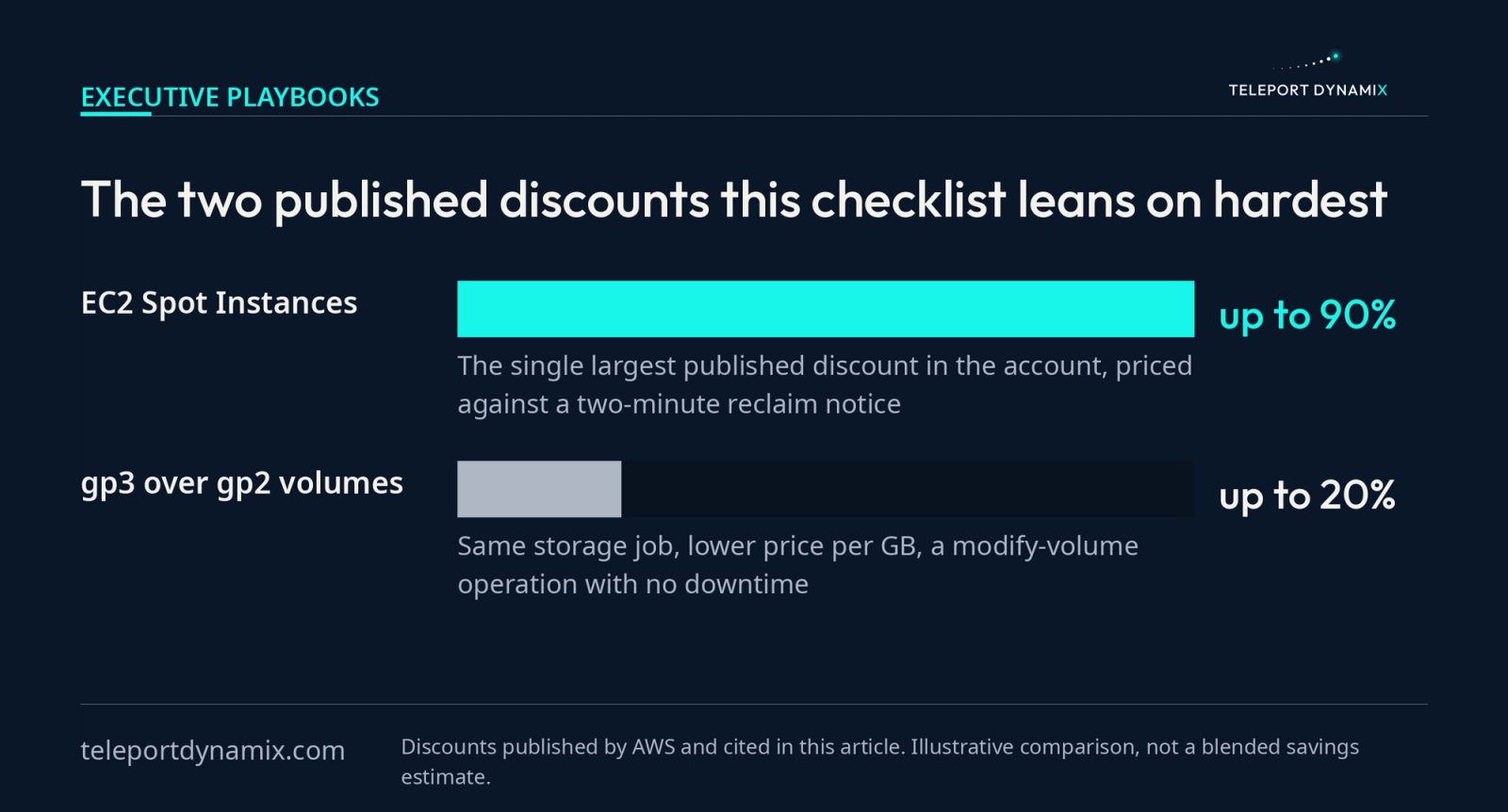
Up to twenty percent. That is the gap AWS itself publishes between gp3 and gp2 general purpose SSD volumes, per gigabyte, for storage that does the same job.
Changing volume type is close to the smallest engineering action available to you. It is also a decent illustration of why AWS bills stay high: the saving was never hidden, it was simply never anybody's Tuesday.
This is the second chapter of a six-part series on cloud cost, and where the pillar argues the bill is a printout of architecture, this one gets specific. Below is the AWS cost optimization checklist our advisory practice works through, with the mechanism behind each item and the price each one asks you to pay.
Key takeaways
- Instrument before you cut. Cost Explorer and Compute Optimizer tell you where the money went and what the utilization actually was, and neither will tell you which design decision put it there.
- Right-sizing is the largest single lever on an AWS bill, and Graviton is the version of it that people forget: same workload, different processor family, published price performance advantage.
- Savings Plans, Reserved Instances and Spot are three different instruments. Commitments buy your floor at a discount. Spot buys your peak at up to 90% off and can take the capacity back with two minutes of warning.
- Storage is where the bill grows while nobody is watching. AWS publishes gp3 at up to 20% lower price per GB than gp2, and S3 lifecycle rules exist because almost nobody sets them at bucket creation.
- Network topology is a cost you drew on a whiteboard. NAT Gateways and cross-AZ chatter are architecture findings that arrive dressed as line items.
Cost Explorer answers where the money went, never why
Start with instrumentation, because a cut made without measurement is a guess with a change ticket attached.
AWS Cost Explorer is the native tool for visualizing and analyzing spend over time, with filtering and grouping by service, account, tag and usage type. It is free to use in the console, it holds roughly a rolling year of history, and it forecasts forward. What it will not do is tell you why a number moved.
That distinction is why this work belongs to engineers rather than to finance. The FinOps Foundation's principles say it plainly: accountability for cost is pushed to the edge, with engineers owning it from architecture design through to ongoing operations.
Which AWS cost tool should you use for what?
Four native tools, compared by the question each one is built to answer and what it costs to run.
| AWS cost tool | Question it answers | Direction | Cost to use |
|---|---|---|---|
| Cost Explorer | Where did the money go, sliced by service, account or tag | Retrospective | Free in the console, priced per API request |
| AWS Budgets | Are we about to cross a threshold we set | Forward looking | Two budgets free per account, then a small daily fee |
| Compute Optimizer | Which configuration should this workload actually run on | Prescriptive | Free, with enhanced infrastructure metrics charged separately |
| Cost and Usage Reports | What is on every line of the bill, at full granularity | Raw data | Free, you pay S3 storage and query costs |
Teams conflate the first two constantly, then wonder why an alert never fired on a number Cost Explorer had been showing for a month. Explorer has no opinion about the future and Budgets has no memory of the past, so running one without the other leaves half the loop open.
Compute Optimizer is the one that points at a fix. It analyzes CloudWatch utilization history for EC2 instances, Auto Scaling groups, EBS volumes, Lambda functions and ECS services, then names alternative configurations with a projected cost and performance impact.
Treat that output as a hypothesis, not a work order. It sees CPU, memory when the CloudWatch agent is installed, and network. It does not see your quarterly batch job.
Sitting above all four, AWS Cost Optimization Hub aggregates right-sizing, idle resource, Graviton migration and commitment purchase recommendations across every account in your organization, deduplicates them, and puts an estimated saving on each.
Opt into it before you start, for a reason that has nothing to do with the recommendations. It gives you one savings number to measure the whole exercise against, which is the number somebody will ask you for in month three.
Cost allocation tags do nothing until somebody activates them
AWS treats the tag on a resource and the cost allocation tag as two separate objects. You can tag every instance correctly and still group by nothing in Cost Explorer, because a user-defined tag key only becomes a grouping dimension after a management account user activates it in the Billing and Cost Management console.
Until that happens the spend lands in an unallocated pool, and every conversation about it becomes a negotiation between teams rather than an engineering decision.
So set the key at provisioning time in your infrastructure code, activate it once at the organization level, and enforce it with an AWS Organizations tag policy rather than a Slack reminder.
Right-sizing is the largest lever and the one people resist
Compute is where money concentrates on an AWS bill, so a point saved here dwarfs the same point saved on storage. It is also the item teams stall on longest, because shrinking an instance feels like spending safety to buy money.
AWS will settle that argument for you if you let it, and the settling happens in three places:
- The evidence is already in the account. Compute Optimizer classifies instances as over-provisioned, under-provisioned or optimized against fourteen days of utilization by default, and the lookback extends to three months once you turn on enhanced infrastructure metrics.
- Memory is the blind spot. Utilization comes from CloudWatch, and CloudWatch cannot see memory on EC2 unless the agent is installed, so an instance can read as over-provisioned on CPU while RAM is the real constraint.
- The steps are reversible. Changing type on an EBS-backed instance is a stop, modify, start, so nothing in this item is a decision a later step cannot undo.
Read the percentile that matches your real risk
Sizing against the mean will page someone. Sizing against the observed maximum reproduces the waste you started with. Size against the percentile that reflects the failure you can genuinely tolerate, which for a queue worker is not what it is for a checkout path.
Then move one instance size, watch a full traffic cycle including your weekly peak, and move again. That measured cadence is the whole point of how you reduce cloud costs without losing engineering speed, rather than trading one for the other.
Graviton is a right-size you make sideways
The forgotten lever. AWS Graviton processors are Arm-based and AWS positions them as the best price performance option for EC2 workloads, which means the same work can move to a cheaper instance family without shrinking anything.
Graviton is a different CPU architecture, so anything with a compiled native dependency needs a rebuild and a test pass, and a few third-party agents still lag on Arm builds. For a containerized service on a managed runtime it is often a base image change and a load test. For a legacy binary nobody can rebuild, it is a project.
If your workload is genuinely x86-locked, skip this item and spend the week on storage instead. Do not force it.
Purchase options are three instruments, not three discounts
Reserved Instances, Savings Plans and Spot get treated as one "buy it cheaper" category. Each buys a different shape of demand, and choosing wrong locks in waste you were about to remove.
How do AWS purchase options compare?
The three discount instruments, set against the On-Demand rate they are all measured from.
| Purchase option | What you commit to | Risk you accept | When to use it |
|---|---|---|---|
| On-Demand | Nothing | Highest published hourly rate | Spiky, short-lived or genuinely unpredictable workloads |
| Savings Plans | A fixed hourly spend for one or three years | Paying for a floor that later shrinks | The committed baseline, bought after right-sizing |
| Reserved Instances | One or three years on a specific configuration | Discount stranded if the fleet drifts | Stable workloads you are certain will not move |
| Spot Instances | Nothing | Two-minute reclaim notice with no appeal | CI runners, batch, rendering, elastic tier above the baseline |
Commitments buy the floor, so find the floor first
Compute Savings Plans and EC2 Instance Savings Plans behave differently too. The EC2 Instance variant buys a deeper rate for locking to one instance family in one region, so it is right only when that family is staying put.
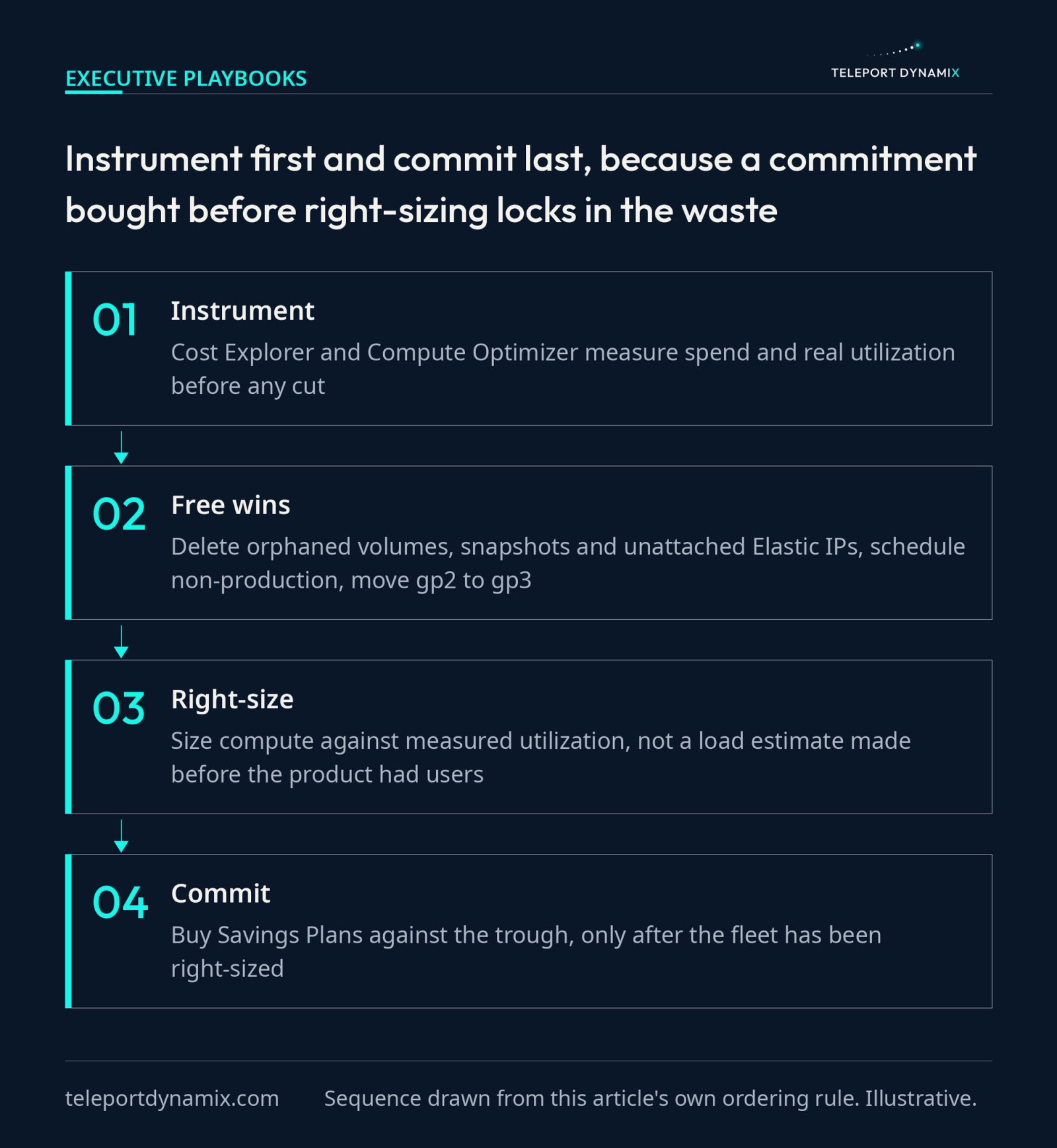
Sequence decides whether any of it is real. Right-size first, find the trough the workload actually holds, then commit against it. Buy against an un-right-sized fleet and you have purchased three years of your own waste at a discount. Cheaper waste. Still waste.
An entire vendor category exists because that floor keeps moving after you buy. Automation layers like Zesty's commitment manager track coverage against a baseline that moves with the fleet. The market is the tell: the commitment you sign today is a claim about a workload you have not written yet.
Spot buys the peak, and it can take it back
AWS documents the Spot savings at up to 90% compared to On-Demand prices, the largest published discount in the account. The catch is documented too: a two-minute interruption notice arrives through instance metadata and EventBridge before the instance stops.
Two minutes is plenty for a stateless worker draining a queue and nowhere near enough for a stateful database primary. Put Spot under your payment service and you will pay for the discount in an incident report.
Storage grows while nobody is watching it
Compute waste is a decision somebody made. Storage waste is the absence of a decision, accumulating at a fraction of a cent per gigabyte per month, forever.
Where does storage cost hide on an AWS bill?
Five storage line items that bill for more than they return, with the fix each one takes and the risk that fix carries.
| Storage item | Why it costs more than it should | The fix | What the fix risks |
|---|---|---|---|
| gp2 volumes | Performance is bought by over-provisioning capacity | Modify the volume type to gp3 | Nothing, the change runs online with no downtime |
| Detached EBS volumes | Storage bills on after the instance is terminated | Delete once nothing references the data | Losing data that no snapshot covers |
| Stale snapshots | Backup policies outlive the machines they protected | Expire by age with a lifecycle policy | Breaking a compliance retention window |
| Unattached Elastic IPs | Idle addresses bill by the hour by design | Release the allocation | A DNS record still pointing at the address |
| Cold objects in S3 Standard | Hot storage rates on data nobody reads | Lifecycle transition rules keyed to object age | Minimum duration charges on very small objects |
The gp3 migration is the item on this list with no honest argument against it. Because gp3 configures IOPS and throughput separately from capacity, the old habit of over-provisioning disk size purely to buy performance stops paying anybody anything.
The orphans take longer, and not because deleting them is hard. Proving nothing references them is the whole job.
Lifecycle rules are the setting nobody sets at bucket creation
S3 lifecycle configuration transitions objects between storage classes or expires them entirely on a schedule keyed to object age. Logs, exports and build artifacts do not need millisecond retrieval in perpetuity, and no default bucket setting will ever raise the question with you.
Two AWS billing details decide whether tiering actually pays. Every transition is a priced request, and the infrequent-access classes bill a minimum object size of 128 KB and a minimum storage duration of 30 days, so a bucket of millions of small log objects can cost more tiered than it did sitting in Standard.
Where the access pattern is genuinely unpredictable, S3 Intelligent-Tiering moves objects between access tiers on observed usage for a per-object monitoring charge. The same arithmetic applies. Check object count and average object size before you switch it on everywhere.
Network topology is a cost you drew on a whiteboard
Data transfer is the one category on this list you cannot right-size after the fact. Everything else here is a setting you change. This one is a shape you committed to.
NAT Gateways carry an hourly charge plus a per-GB data processing charge, which means a chatty private subnet pulling packages and container images through NAT all day pays twice for traffic that a gateway VPC endpoint would have carried at no charge at all. S3 and DynamoDB both have gateway endpoints. Cross-AZ traffic between two services that could have sat in one zone is the same story with a different SKU.
When egress turns out to be the finding, you have left the configuration conversation and entered a scalability review, because the fix is a design change carrying an engineering estimate. The same physics apply on other platforms, though the first move differs: Azure cost optimization starts with your licensing, and Microsoft's cost management tooling makes the same bet AWS does about showing the engineer the number near the decision.
Non-production does not need to exist at 3am
Dev, staging, QA and whatever got spun up for last quarter's load test all bill by the hour whether anybody is logged in or not. An environment needed from 8am to 6pm on weekdays but left running continuously costs about 250% more than it has to.
The engineering is trivial, and it comes in two grades:
- Schedule it off. An EventBridge cron rule invokes a Lambda that calls StopInstances each evening and StartInstances each morning, and AWS publishes Instance Scheduler as a supported solution if you would rather not own that code.
- Make it reproducible. An infrastructure-as-code definition good enough that anybody can rebuild the whole environment in fifteen minutes, which retires the fear that deleting it loses something.
One AWS detail decides which grade you actually need. Stopping an EC2 instance ends the instance charge, but the EBS volumes attached to it keep billing at the full rate, so a schedule recovers the compute and leaves the storage running all night.
That is why the second option is the real work, and why teams avoid it. Environments get hoarded because they are not reproducible, which makes them precious. Fix the reproducibility and the savings arrive as a side effect, which is the sort of second-order return that shows up in technical due diligence long before it shows up on an invoice.
Second pass through this list takes an afternoon
First pass is a project. Second pass is a Thursday, and that gap is the real return on running the first one properly.
Three things change once the account has been through it:
- Compute Optimizer becomes readable. With tags enforced at provisioning and the fleet sized once against measured utilization, its findings shrink to a short list somebody can action, rather than a wall of recommendations everyone has learned to scroll past.
- Renewal stops being a negotiation. You already know the trough, because you established it before you bought against it, so the Savings Plans question at renewal is how far the baseline moved.
- New designs arrive with a price attached. A proposal routing everything through NAT, or putting a stateful service on Spot, gets that raised in the design review, because the account already has both findings written down.
The engineering community keeps reaching this from different directions. Martin Fowler's bliki defines cloud computing as a shift in who owns and operates the machines, which is exactly the shift that moved the buying decision onto an engineer's desk, and InfoQ's FinOps coverage follows the practitioner version of the same move. Tooling vendors landed there too. What a platform like Vantage is ultimately selling is a number sitting next to the team that caused it, which is where CloudZero's work on cost optimization arrives from the finance side.
The checklist only holds if somebody owns it
Cost feedback has to reach the engineer at the moment of the decision, because that is the only moment anything gets decided. A checklist run once cannot do that. The standing version of it is the case that FinOps is an operating discipline, not a cost tool makes in full, and the reason a good pass quietly unravels by month nine is that cloud cost management needs an owner, not a tool.
If you would rather not run the first pass yourself, a cloud cost audit scores this same list against your own account and hands back an ROI per action with a 90-day sequence for working through them.
Either way, the order holds. Instrument. Free wins. Right-size. Then commit.
Frequently Asked Questions
What does AWS Cost Explorer do?
AWS Cost Explorer is the native console tool for visualizing, understanding and analyzing your AWS spend over time. It lets you filter and group costs by service, linked account, tag, region or usage type, view roughly a year of history, and generate forecasts. It shows you where money went. It cannot tell you which architecture decision sent it there.
What is the difference between AWS Cost Explorer and AWS Budgets?
Cost Explorer looks backwards and Budgets looks forwards. Explorer is retrospective analysis: it visualizes and slices historical spend so you can find what changed. Budgets is a forward guardrail: you set a cost or usage threshold and it alerts you, or triggers an action, when actual or forecast spend crosses it. Run both together.
Should I buy Savings Plans or run on Spot Instances?
Buy Savings Plans for the baseline your workload never drops below, and run Spot above it. Savings Plans lower the rate on committed hourly spend for one or three years. Spot sells spare capacity at up to 90% off but can reclaim it on two minutes of notice, so it suits interruptible work only.
Is it worth moving EBS volumes from gp2 to gp3?
Yes, for almost every general purpose workload. AWS prices gp3 at up to 20% lower cost per GB than gp2 and includes a fixed baseline of IOPS and throughput at any volume size, so you stop over-provisioning capacity to buy performance. The change is an online volume modification with no downtime.
Which tool is best for AWS cost management?
The native stack covers the substance for most teams: Cost Explorer for analysis, Budgets for guardrails, Compute Optimizer for right-sizing recommendations, and Cost and Usage Reports for raw data. Third-party platforms add container-level allocation and anomaly detection. No tool decides anything. It surfaces the number an engineer then has to act on.
Where should an AWS cost optimization effort start?
Start with the free wins that need no design review: delete orphaned volumes, snapshots and unattached Elastic IPs, schedule non-production environments, and move gp2 volumes to gp3. Then right-size compute against measured utilization. Only after that should you buy Savings Plans, because commitments purchased before right-sizing lock in the waste.
Continue Reading:
More In This Series:
- Cloud Cost Optimization Is Engineering, Not Billing
- Reduce Cloud Costs Without Losing Engineering Speed
- FinOps Is an Operating Discipline, Not a Cost Tool
- Cloud Cost Management Needs an Owner, Not a Tool
- Azure Cost Optimization Starts With Your Licensing
More from Teleport Dynamix:


